
For restaurant groups and independent venues
Sync the tools you already love for a seamless front-of-house.
Mozrest is the “invisible bridge” between your reservation software, POS system, and booking channels. We aren’t here to replace your favourite tools—we’re here to make them talk to each other perfectly.







Benefits
Incremental bookings
Capture more diners by instantly listing your tables on 20+ booking channels.
Automated operations
Stop manual entry. Bookings from all channels flow directly into your reservation software.
Guaranteed No Overbookings
Your availability is updated in real-time across every booking channel, your reservation system, and your POS.
Two-way integration
We enable two-way data flow between reservation software, POS systems, and booking channels, ensuring real-time updates for reservations, payments, and guest information.



Features
Data Enrichment
Link past orders from your POS to guest profiles in your reservation software.
Financial Reconciliation
Automatically push prepayments from booking channels through to your POS bill.
Real-time sync
When a table is cleared in the POS, the status updates instantly in your reservation software.
Our partnership with The MICHELIN Guide
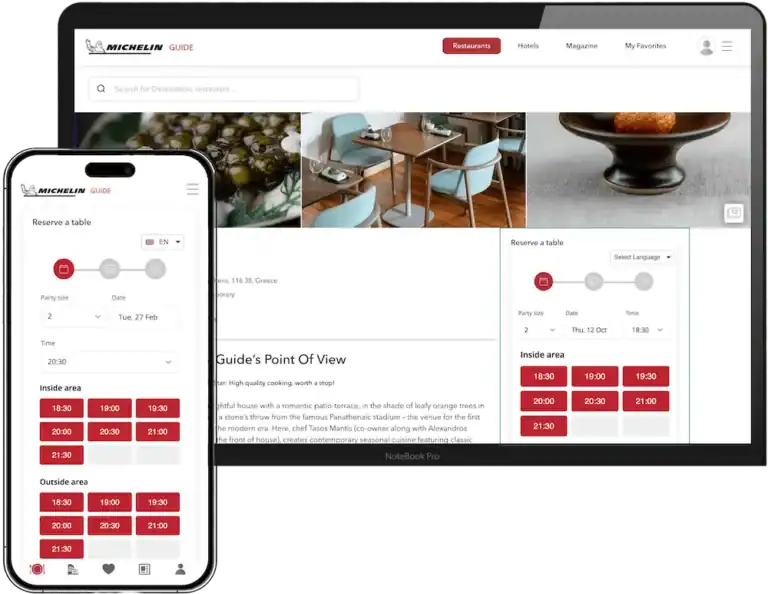
We’re proud to partner with The MICHELIN Guide. Thanks to our partnership, restaurants can receive bookings directly from The MICHELIN Guide app and website into their existing reservation systems.
Testimonials

With just a few clicks, diners can secure their spot at our restaurant, thanks to a seamless booking experience.

We’ve seen a remarkable improvement in guest satisfaction since receiving bookings from The MICHELIN Guide through Mozrest, as it ensures a hassle-free booking experience for our guests.
Efficiency is key, and being bookable on The MICHELIN Guide has streamlined our reservation process, enhancing our reputation for excellent customer service.
The Mozrest team was extremely helpful and very efficient in connecting The MICHELIN Guide to our SevenRooms reservation system. Thanks to their help, our restaurant went live without delay
Receiving bookings from guests looking for quality and sustainability has never been so simple.
With Mozrest, we’ve witnessed a significant increase in bookings, especially from guests who rely on The MICHELIN Guide for memorable culinary experiences.
It is essential for us to create a connection with our customers. This connection starts when our guests book themselves directly from our The MICHELIN Guide page.
FAQ
Is Mozrest a reservation software provider?
No. We are the connector (middleware) that sits between your systems. We do not provide the software you use to manage your floor, guest database, or table layouts. Instead, we ensure that the reservation software you already love “talks” perfectly to your POS and your external booking channels.
Will Mozrest replace my current POS or reservation software?
No. Mozrest is a dedicated connector designed to work alongside your existing tools. We partner with both POS and reservation system providers to ensure they can communicate with one another in real-time. To use Mozrest, you keep your current subscriptions with your POS and reservation software providers; we simply provide the link that allows them to stay in sync.
Will I have to manage a new dashboard for bookings?
No. The goal of Mozrest is to be invisible. You continue using your existing Reservation Software and POS; we simply work in the background to keep them synced.
How do I know if my specific POS and Reservation tools are supported?
We support 100+ integrations across the industry. Because we act as the connector, we are constantly adding new partners to our ecosystem. You can check our ‘Partners’ page to see if your current systems are already supported. If they aren’t listed yet, feel free to reach out to them and let them know you’d like a Mozrest integration.
Why do I need Mozrest if I already have a POS?
Most POS systems and reservation tools don’t speak the same “language.” Mozrest acts as the translator, ensuring that when a guest pays or sits down, both systems know about it instantly.
How can I start using Mozrest at my restaurant?
To get started, simply ask your POS or Reservation System provider to activate Mozrest. Let them know which features you need:
- POS Connect
- Channel Manager
- Listing & Review Manager